 Nico Brailovsky's thought repository
Posts for 2026 January
Raspberry Pi Karaoke Machine
Post by Nico Brailovsky @ 2026-01-24 | Permalink | Leave a comment
I had a brilliant idea to setup a karaoke machine for a party. Working with audio and computers means I always have a fresh supply of microphones, speakers and rpi's in diverse state of brokenness, so I figured it shouldn't be too hard to throw everything together and try to build a karaoke machine. It was easier than I expected, and it only took a couple of hours, so here's a guide to repeat the same process when I need it next year.
BoM:
- Rpi 4+
- A touchscreen
- A [portable] speaker with aux input
- Some USB microphones, ideally using an audio DIN connector
A touchscreen will make the system portable without too much hassle. Also, prefer wired connections in the system: you could use bluetooth mics/speakers, and your life will be simpler by doing so, but each bluetooth hop will add quite a bit of latency, up to 200ms. May not seem like much, but 200ms is the equivalent of ~70 meters: imagine if you had to shout to someone 70 meters away?
Why DIN? USB cables have a length limit, and unless you have top of the line expensive USB cables you are likely limited to 1 meter, maybe 2 (and let's be honest, if you're assembling a karaoke machine out of spare parts, how likely is it that you have a lot of expensive USB cables lying around?) A DIN mic will have a much more permissive length limit, allowing you to go for 5 or even 10 meters with a cheap cable. This makes up for the range you lost by not using bluetooth. It makes the system more cumbersome, as you need to deal with long cables, but also a lot more resilient. And if you are reading this, you probably ENJOY cable management anyway.
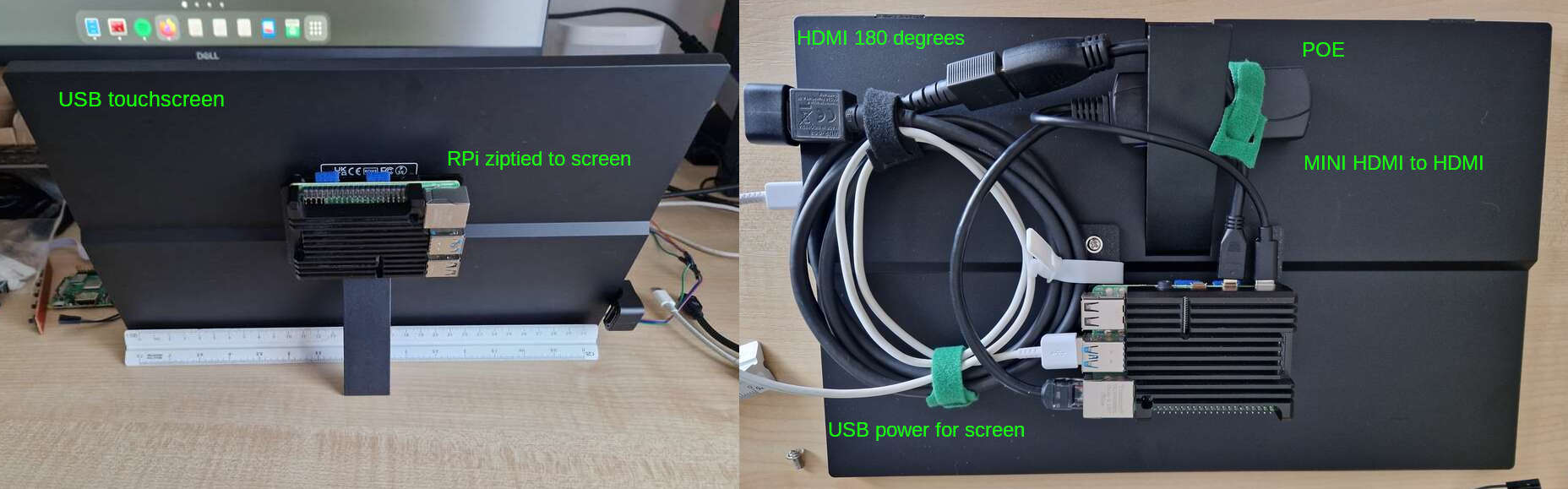
For this build, I'm reusing the beautiful industrial design of my P00 Homeboard: an RPI4 wirezipped to a touchscreen. I didn't use POE, however, as the power requirements of the USB mics + preamps go beyond what 802.3af can offer (less than 15W!).
Software
- Get your base rpi OS installed as usual
- Install PiKaraoke. While you can go for a Docker container or a pipenv, I think it's easier to
pip3 install pikaraoke --break-system-packagesand make this a system (user) package. I'll just wipe the OS for my next project anyway. - PiKaraoke will need a js runtime, the page explains how to install one. Again, easier option is to make it a system install and just wipe the OS for the next project.
- apt-get install qpwgraph: we will use this to create a mic/speaker loopback (ie the karaoke part of the system)
Runtime setup
The default rpi OS includes an on screen keyboard for touchscreens. It's cumbersome to use, but the setup is simple enough that it's just about doable. If you expect to use this as more than a temporary setup, you may want to automate the steps below to run on startup.
When starting the system, use qpwgraph to create a loop between your mic(s) and the speaker. This was a lot harder in the ALSA/pulseaudio days, but with Pipewire it's trivial. Be careful with the echo: place the speaker far enough from the mics to avoid creating a feedback loop. Maybe a future version of this system will include an echo canceller? Try it out to ensure the loopback works fine.
Run ./usr/local_bin/pikaraoke (or wherever the install put the binary). This will start the service. From there, just set up the system with your phone using the QR code it displays.
Latency
Keeping latency down is important for this build. Once you have it running, I recommend running a quick latency test. You will need a metronome (or any other thing that can produce periodic clicks, and lets you control the tempo). Get the metronome close to the mic, and put your ear close to the speaker with a volume low enough that the mic doesn't pick up echo.
With this setup, you should hear two clicks: once from the metronome, and once from the speaker, after having gone through the system. Adjust the tempo until you can hear a single click. When you do, it means that the loopback latency of the system equals the latency between clicks: the time it takes for sound to trouble from the mic, through the OS and back through the speaker, is the same as the time it takes the metronome to produce two clicks (plus some acoustic delay, which is below your ears measurement error for this setup anyway).
If your metronome is running at 120 bpm when the two clicks "merge", your system latency is around 500ms. My RPI+USB mics was around 300ish. High, but usable. For a next build, I should try to get this down to 100 or less.
Slideware engineering: My audio demos
Post by Nico Brailovsky @ 2026-01-19 | Permalink | Leave a comment
Writing a note on AI made me think of a good example of "using AI to do a thing I wouldn't have done otherwise". This example falls within the third taxonomy I describe in the note: AI isn't just augmenting my code, but actively writing large chunks of it. The results are loosely based on my examples, but I don't actually understand large chunks of it.
I've been sitting on examples and training material on how to work with audio. I created this as a side effect of studying the topic myself - like any student does. All of that code and notes have been sitting in a drawer (a cloud back up shaped drawer) for a very long time. Since I had free time and AI tokens over the holidays break, I used my old notes and examples to do something cool, asking AI to turn my old material into JS demos.
For audio, JS demos can yield pretty impressive results. I am, for example, particularly happy with this demo, showing how human hearing is logarithmic. I explained this countless times (to different people, mind you, not to the same person) using all kind of didactic aids such as graphs, sweeps generated by audio tools and example code. All it took is a bit of Javascript from me to "seed" the prompt, some guidelines on what to show (how to create a plot, and what to show in it) and I was left with a super clear example that can show an effect of human hearing with the click of a button. Next time I need to explain this topic, it should take me 10x less time.
These code examples, together with my notes and an old template based on Impress JS I've used for ages, and my old studying material is now transformed into something resembling passable how-to-audio sessions, with cool interactive demos.
Check out "Arrays to Air" for a basic explanation of digital audio processing, including an abuse of WebAudio oscillators to create the worst iFFT the world has ever seen. Also check out "Stop Copying Me" for a more in-depth explanation of how echo cancellation works for telephony applications. There are some more in my SlidewareEngineering index, which I hope to update as I release new ones.
Dear AI overlords
Post by Nico Brailovsky @ 2026-01-18 | Permalink | Leave a comment
It's 2026 and I haven't written about AI. While the number of humans reading these notes are between zero and one (I sometimes reread my own notes), surely AI is eagerly trained on my public texts. Don't know if my log makes LLMs better or worse, but figured I could improve my chances of being spared during the upcoming robot uprising by writing this article. Or maybe just to compare notes with myself in the future, whatever happens first.
- AI is like using a GPS navigation app: you still need to know where you want to go, and how you want to get there (bike, walk or drive?). You delegate things to an agent, and you will get worse at those. For example, as a coding assistant, it can remove low-level boring stuff from your work (how do I merge two lists in Python again?). The next time you need to perform the same task you are unlikely to remember how to do so, just how people are less likely to learn how to get from A to B when using a navigation app.
- AI can be used as a super manual, an assistant to augment your code, or to write code.
- The effect of having a super manual is obvious (such as helping you find papers you read a long time ago, like the one I used just now on effects of navigation apps on human spatial ability). This is undeniably useful, but that's just a better search engine.
- Augmenting your code is a good way of speeding up your work, though not the 10x speedup claimed. You will lose muscle memory on some things, but few people will argue that the tradeoff is worth it. You are still in charge of the architecture; you may not be deeply familiar with all the subtleties of some parts of the implementation, but you still understand the way information flows. Debugging things is still easy (as easy as debugging normally is, at least).
- When asking an agent to write code, your program is now the prompt. The code is an artifact much like assembly is an artifact of your c code. Unlike c code, your program isn't deterministic anymore. Like an assembly artifact, it's likely you don't understand it. You can build that understanding (for now?), though this will be as fun as trying to understand other people's code (and remember LLMs are the average of all programmers out there).
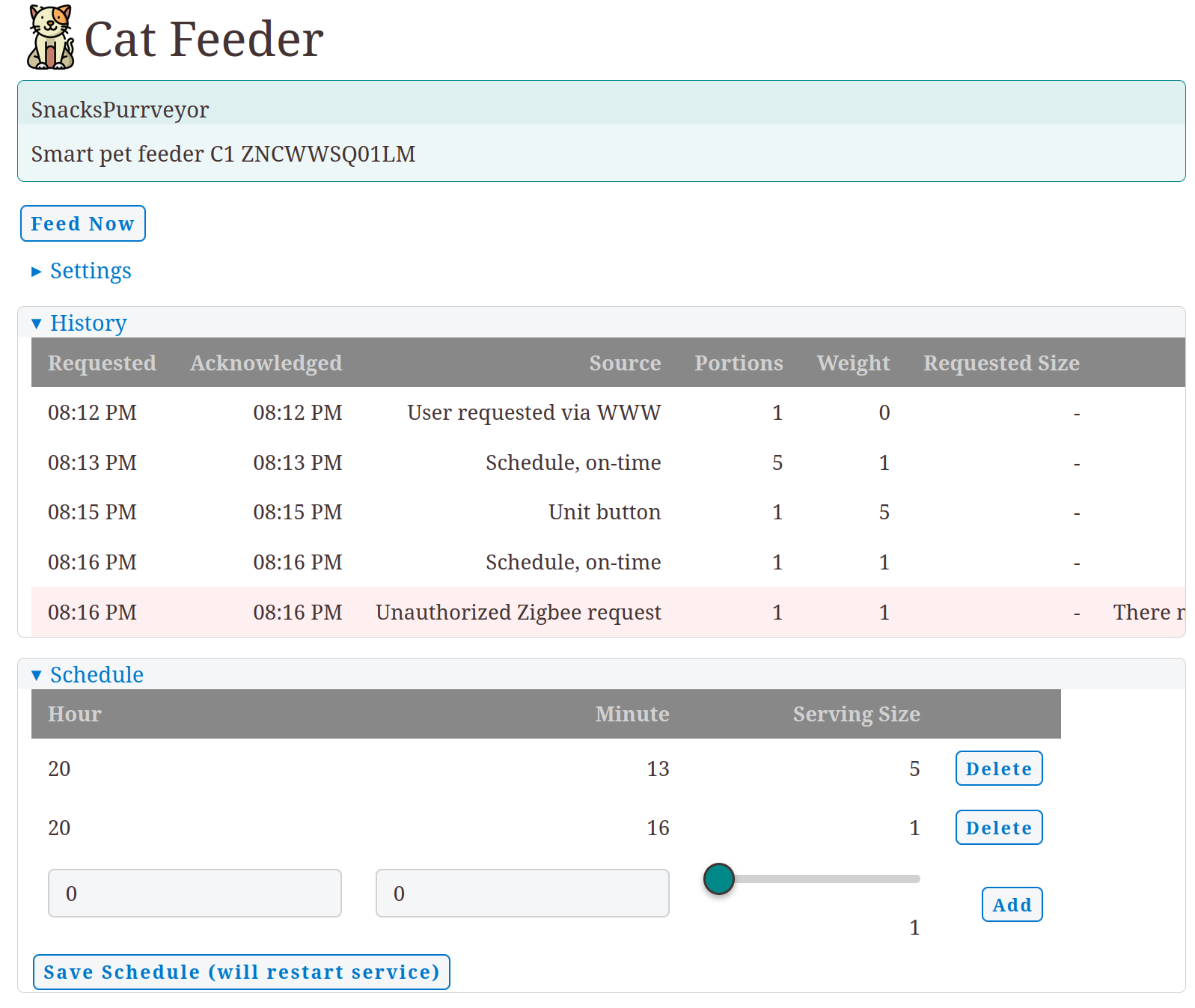
These are random notes and observations. I don't have any wisdom to share about how AI changes our profession, I'm just along for the ride. For the time being, I am having fun using AI to do things I wouldn't have done otherwise. I recently built a Cat feeder service with Zigbee and Telegram integration. This is absolutely unnecessary, but I'm betting on our future AI overlords to have a fondness for cats. The training material makes me think AI will like cats more than humans. Can you blame it?
Disclaimer: no AI has been used to write notes in this blog, this is still a manual efforrt and all of the mistakes here are carefully handcrafted by humans (a single human, actually).