 Nico Brailovsky's thought repository
I had a brilliant idea to setup a karaoke machine for a party. Working with audio and computers means I always have a fresh supply of microphones, speakers and rpi's in diverse state of brokenness, so I figured it shouldn't be too hard to throw everything together and try to build a karaoke machine. It was easier than I expected, and it only took a couple of hours, so here's a guide to repeat the same process when I need it next year.
BoM:
- Rpi 4+
- A touchscreen
- A [portable] speaker with aux input
- Some USB microphones, ideally using an audio DIN connector
A touchscreen will make the system portable without too much hassle. Also, prefer wired connections in the system: you could use bluetooth mics/speakers, and your life will be simpler by doing so, but each bluetooth hop will add quite a bit of latency, up to 200ms. May not seem like much, but 200ms is the equivalent of ~70 meters: imagine if you had to shout to someone 70 meters away?
Why DIN? USB cables have a length limit, and unless you have top of the line expensive USB cables you are likely limited to 1 meter, maybe 2 (and let's be honest, if you're assembling a karaoke machine out of spare parts, how likely is it that you have a lot of expensive USB cables lying around?) A DIN mic will have a much more permissive length limit, allowing you to go for 5 or even 10 meters with a cheap cable. This makes up for the range you lost by not using bluetooth. It makes the system more cumbersome, as you need to deal with long cables, but also a lot more resilient. And if you are reading this, you probably ENJOY cable management anyway.
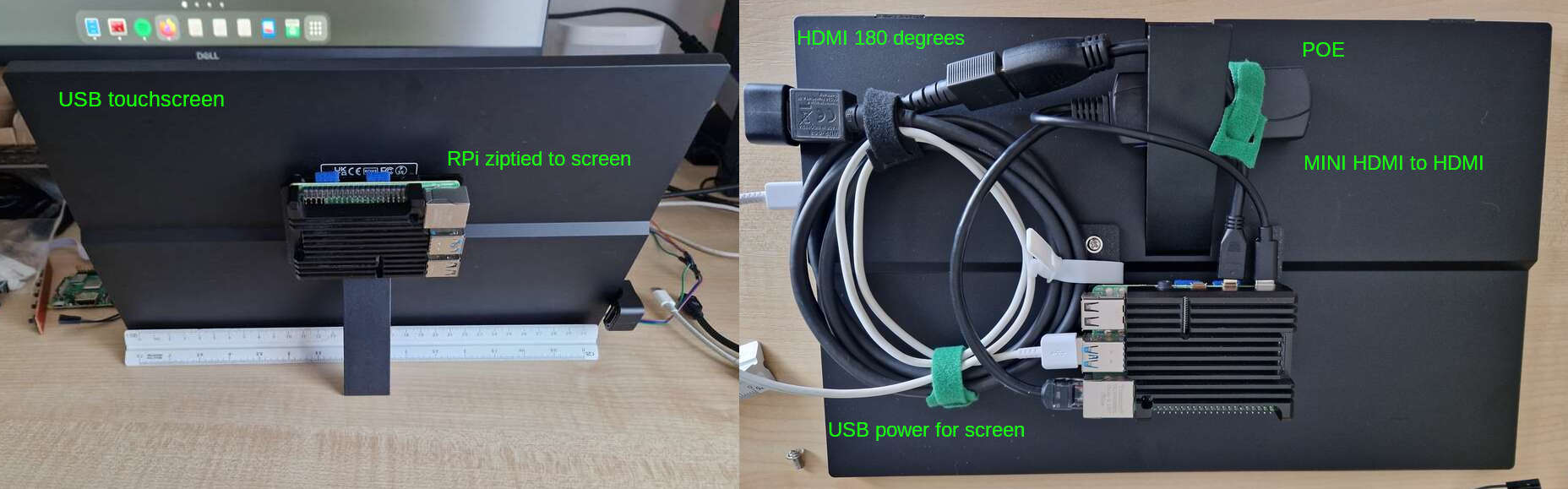
For this build, I'm reusing the beautiful industrial design of my P00 Homeboard: an RPI4 wirezipped to a touchscreen. I didn't use POE, however, as the power requirements of the USB mics + preamps go beyond what 802.3af can offer (less than 15W!).
Software
- Get your base rpi OS installed as usual
- Install PiKaraoke. While you can go for a Docker container or a pipenv, I think it's easier to
pip3 install pikaraoke --break-system-packagesand make this a system (user) package. I'll just wipe the OS for my next project anyway. - PiKaraoke will need a js runtime, the page explains how to install one. Again, easier option is to make it a system install and just wipe the OS for the next project.
- apt-get install qpwgraph: we will use this to create a mic/speaker loopback (ie the karaoke part of the system)
Runtime setup
The default rpi OS includes an on screen keyboard for touchscreens. It's cumbersome to use, but the setup is simple enough that it's just about doable. If you expect to use this as more than a temporary setup, you may want to automate the steps below to run on startup.
When starting the system, use qpwgraph to create a loop between your mic(s) and the speaker. This was a lot harder in the ALSA/pulseaudio days, but with Pipewire it's trivial. Be careful with the echo: place the speaker far enough from the mics to avoid creating a feedback loop. Maybe a future version of this system will include an echo canceller? Try it out to ensure the loopback works fine.
Run ./usr/local_bin/pikaraoke (or wherever the install put the binary). This will start the service. From there, just set up the system with your phone using the QR code it displays.
Latency
Keeping latency down is important for this build. Once you have it running, I recommend running a quick latency test. You will need a metronome (or any other thing that can produce periodic clicks, and lets you control the tempo). Get the metronome close to the mic, and put your ear close to the speaker with a volume low enough that the mic doesn't pick up echo.
With this setup, you should hear two clicks: once from the metronome, and once from the speaker, after having gone through the system. Adjust the tempo until you can hear a single click. When you do, it means that the loopback latency of the system equals the latency between clicks: the time it takes for sound to trouble from the mic, through the OS and back through the speaker, is the same as the time it takes the metronome to produce two clicks (plus some acoustic delay, which is below your ears measurement error for this setup anyway).
If your metronome is running at 120 bpm when the two clicks "merge", your system latency is around 500ms. My RPI+USB mics was around 300ish. High, but usable. For a next build, I should try to get this down to 100 or less.