 Nico Brailovsky's thought repository
Posts for 2026 April
Homeboard v2
Post by Nico Brailovsky @ 2026-04-23 | Permalink | Leave a comment
This week I decided to revive my oldest homeboard, one that suffered a bit of unplanned refactoring after a rapid encounter with the floor (about a year ago, now. Turns out I don't quite have enough time for all of my side projects, or I have too many side projects for my free time). Of course, it wasn't really a repair as much as a complete re-do, salvaging a few pieces here and there.
Side note: xkcd 3233 feels very autobiographical, and on topic for my homeboard series.
Electrical changes
While the brains (a Raspberry Pi Zero), the display and the panel controller haven't changed, I found that this homeboard was rather unstable under load (when decoding and rendering a jpeg to screen). This would cause a brownout and the display to shut off for a second, which was quite jarring for a device meant to show pictures. Worse, sometimes this would happen on startup, making it enter a display restart loop (surprisingly, the RPI survived the brownouts).
The brownouts were probably caused by aging components in the boost converter that switched the 5v from the PoE output to 12v for the display controller, eating any margin for power consumption peaks. I changed this to use a 12V PoE output to feed the display, and then a 5V step down for the Pi. I don't know if it's just newer components or a simpler setup (step down is easier than boosting up), but the build was a lot more stable. The Pi is now fed through GPIO, which is limited in current compared to USB. That's probably a good thing, considering my PoE is limited to 12W anyway.
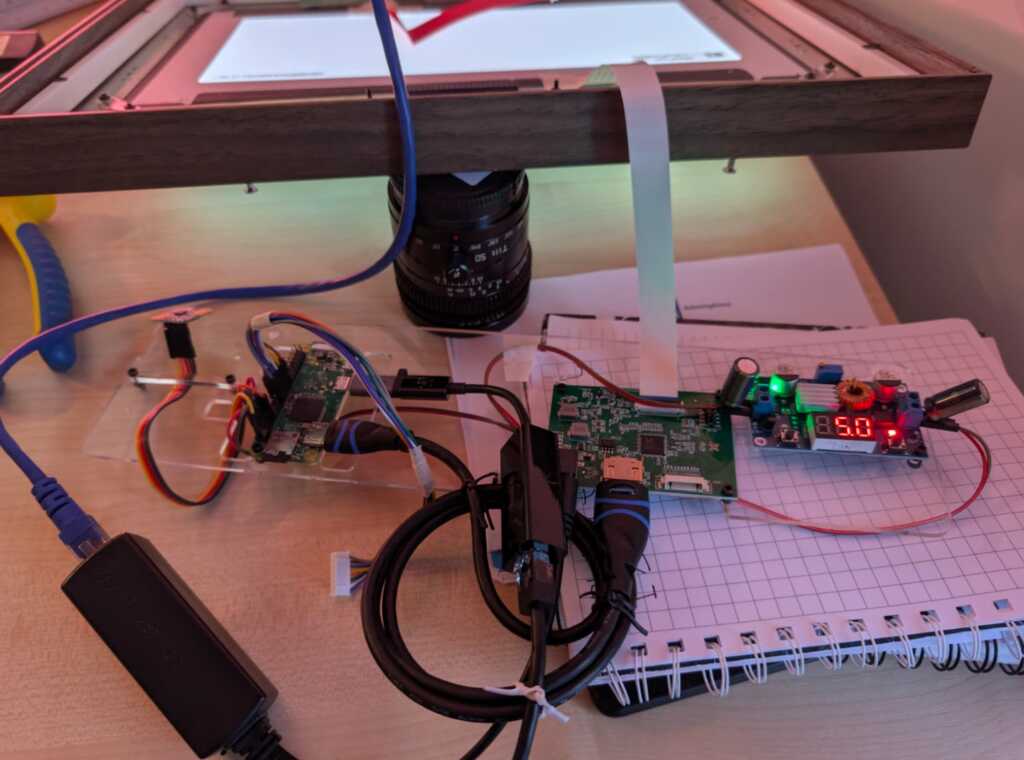
Though going from PoE->Pi->Display to PoE->Display->Pi made my system more stable, there were still transient drops in voltage and, rarely, brownouts causing the display to go off. I don't have any fancy measurement equipment, but I know the system is running at the power limit of my PoE adapter (around 12W), so I added a couple of 1000uF capacitors to handle the transients. 1000 was just a guess based on power usage and assuming a 10ms transient, which seemed reasonable to a layman in this area. This took care of any stability issues, and the system has been rock steady since.
"Industrial design" changes
The new 12v PoE is smaller than my old 5v PoE, so I was able to reuse the old slot that housed it to put the mmWave sensor. This had been a source of hardware bugs before, and the new position lets me keep the sensor isolated from any electrical interference. I'm especially happy about this, as it means that while building this I learnt at least one thing.
The new version also incorporates a clip holder for the eink at the front, so now it's not floating around. It sticks to the (transparent) front pane and acts as a metadata display (here, year + city for the photo being displayed). I found the font needs to be quite large to be useful, which indicates that the screen is too small (about 3'') or that I am too old (both?).
Finally: sooo much tape. For this iteration, I tried to tape down anything that moved, to minimize cables breaking free and escaping. It helps, none of the fragile connection points move, but the end result is as if a mummy had assembled my homeboard. I bet if you are an industrial designer reading this note, you're crying right now. Ragemail welcome (ideally with suggestions to improve the design, too).
Not fixed in this version: there still isn't a good way to hang the frame. It hangs precariously from the wooden edge, without a notch to keep it in place. I was hoping the mount for the boards would double as a wall mount, too, but it's not sturdy enough to hold the weight.
Software changes
Software changes have been massive, but of course less visible than hardware changes. While I still need to update the repo, the new Homeboard doesn't use Wayland anymore. The system now uses DRM, with no compositor on top. This makes startup much faster - quite unnecessary for an appliance that restarts maybe once a year, but the architecture "feels" nicer. It also got split from one monolithic app into a set of services that interface over D-Bus. Perfect for LLMs to dig around and change the project. The software layer now is
- the main "ambience" service (showing pictures, announcements, driving the eink display, etc),
- an occupancy service, that announces if anyone is around to see the pictures,
- a DRM service, that owns the display management,
- a picture service, that provides photos to the ambience service (by grabbing them from wwwslide),
- a D-Bus to MQTT bridge, enabling reporting and remote control of the device.
The new Homeboard software has working eink integration, so I can see picture metadata at a glance, and I finally implemented a UART interface to the mmWave sensor, with quite a lot of AI help to reverse engineer the protocol. I can now calibrate the sensor, which gives much better occupancy results. Moving the sensor to a D-Bus service also means I can replace it with a newer model, whenever I want to (quite likely never).
Finally, the Homeboard is now integrated with my custom home automation service, ZMW. This gives me a few new features, such as using the mmWave sensor in the homeboard as a presence sensor for home automation, controlling the slideshow from a Zigbee button, and using the display to announce things or show useful information, such as the price of cat food in today's spot market.
End result
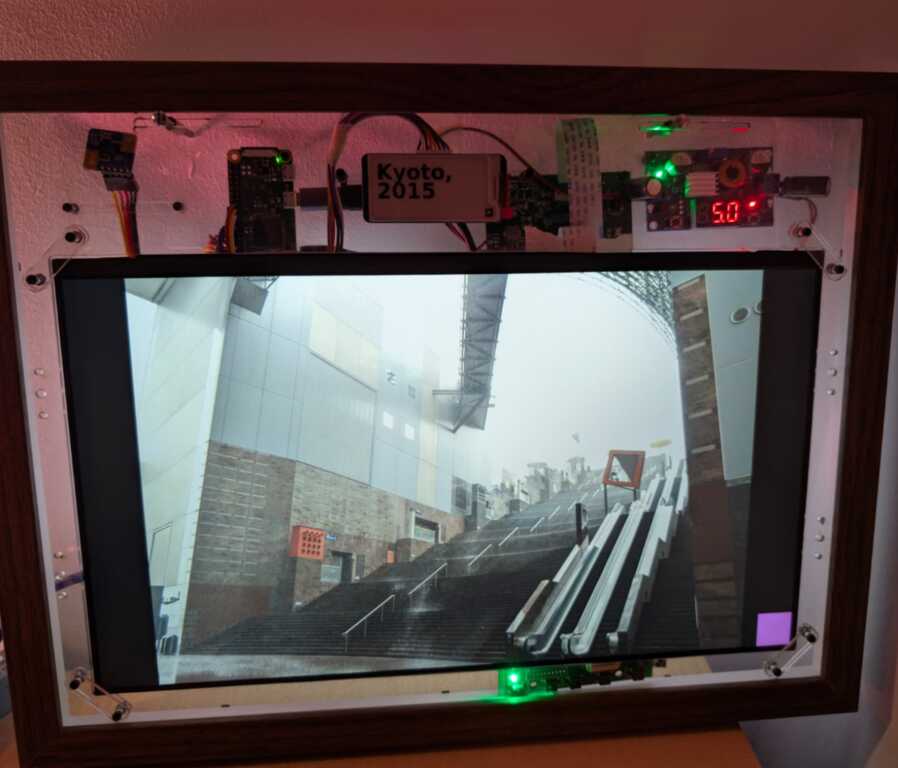
One final complication: after (re)building this new homeboard, I ended with 90% of the parts I need to build a 3rd Homeboard. Should I?
Training a new TTS Voice
Post by Nico Brailovsky @ 2026-04-01 | Permalink | Leave a comment
Just to avoid renaming my blog to "Weekend projects", I actually did this one over the week. My home automation system runs a text-to-speech service, based on Piper. I wasn't entirely happy with the voices that I had, so I decided to train a new one. This turned out to be a fairly involved (even if not very hard) process, so I put some notes for the next time I need to do this, which I'll copy here too because no one charges me for byte stored:
Training a Custom Piper TTS Voice
This project uses Piper as its TTS engine. Piper works great as a real-time(ish) TTS engine for Raspberry Pis. Other engines (Coqui, F5-TTS, Kokoro) offer better quality or style control, but aren't real time in this compute envelope. Training new voices for Piper is not hard, although there are many, many, steps required.
Literature claims about 1 hour of audio is needed to fine-tune an existing model (ie give it a new voice). Training from scratch is 10x that. The recordings need to be, of course, high quality, with no reverb, echo or noise, all from the same voice. For Piper, the training format is 22050 Hz S16 mono. If you want your new voice to sound in a specific way (eg angry), then make sure your training data is... angry.
Training data
You will need to provide training data as individual files, plus a CSV that references the wav file + the text. Something like
wavs/001|This is the first sentence.
wavs/002|Here is another sentence.
Of course, it's unlikely you'll record (or find) an hour of audio in this format. Instead, and much more likely, you'll end up with a single long recording which then can be chopped up in more manageable pieces. For this,
apt-get install ffmpegpip install -U openai-whisper [--break-system-packages]- If needed, pre-preprocess your input (use Audacity to downmix to mono, cut unnecessarily long silences, etc)
- Run the prep dataset script
The script uses Whisper to transcribe and get timestamps from the big wav file, and then chop it up into smaller ones. You should end up with two CSV files, one for "high confidence" sentences and one for the utterances where the model wasn't quite able to transcribe or find a clean sentence boundary.
[Tip: if you're getting your material from an online source, do pw-record out.wav and use qpwgraph as a patch bay to route to a wav file]
Training
The training READMEs of both the old, archived, Piper project, and the new forked Piper project include training docs. I found I needed to read both to build this training guide.
We're not training from scratch, so pick a checkpoint in HuggingFace. If you'll train an English voice, pick an en model - the closest one you can find to your target voice.
Once you have your checkpoint and training data,
sudo apt-get install python3-dev cmake build-essential python3-scikit-build-coregit clone https://github.com/OHF-voice/piper1-gpl.git- Create a venv (we'll install a ton of Python packages):
cd piper1-gpl && python3 -m venv .venv source .venv/bin/activatepython3 -m pip install -e '.[train]'./build_monotonic_align.shpip install scikit-build-corepip install scikit-buildpip install tensorboardIf you want to monitor progress (you do)python3 setup.py build_ext --inplace
At this point, you should have an environment ready for training, which I trigger with
python3 -m piper.train fit \
  --data.voice_name "Nico" \
  --data.csv_path metadata.csv \
  --data.audio_dir $WAVs \
  --model.sample_rate 22050 \
  --data.espeak_voice "es-AR" \
  --data.cache_dir ./cache \
  --data.config_path '$COPY_OF_CHECKPOINTS_config.json' \
  --data.batch_size 22 \
  --data.num_workers 8 \
  --trainer.precision 16-mixed \
  --ckpt_path '$PATH_TO_CHECKPOINT'
I would be surprised if this works out of the box, however. A few things I needed to fiddle with to get this running:
- Module names: some manuals say
python3 -m piper.train, others saypython3 -m piper_train.fit. You may need to read some code to find out which one you need. - Model mismatches; I downloaded a high quality checkpoint but was trying to train a mid quality model. This will error out with Torch complaining of architecture mismatches (I fixed by downloading a mid quality model)
- Metadata CSV format may be wrong, it may or may not want the file extension in the CSV file
- OOMs, of course. You'll need to play with batch_size and num_workers to fit your training system (You aren't training in your target, right?)
- Piper refused to load the checkpoint due to Torch version differences. My LLM provided a script to hack an existing checkpoint into something that Piper liked.
Finish Training
While training, you can run tensorboard --logdir ./training/lightning_logs, this will create a web UI with information on training progress, and a few audio samples you can listen to. You can stop training once the loss stops going down for a few epochs, or when the audio samples start sounding good enough. The manual claims there is a way to test with arbitrary sentences while training, however, I couldn't make it work.
For reference, in a system with an I7 10th gen + RT2080 (8GB) training was done in about 20 minutes, maybe less. In an old i7 6th gen and 16 GB RAM (no GPU) training would complete after the heat death of the universe.
Once done, you can export your model with python3 -m piper_train.export_onnx /path/to/model.ckpt /path/to/model.onnx and cp /path/to/training_dir/config.json /path/to/model.onnx.json
Linklist
- Checkpoints for fine-tuning in HuggingFace
- Other person's notes on training Piper
- Old Piper training docs
- New Piper training docs
Alternative engines: